
SKlauncher version vs Minecraft version
The number 3.2.18 identifies the legacy stable SKlauncher application. SKlauncher 4 identifies the launched newer line; checked August 16, 2026, its release notes reach 4.0.43 while downloadable platform files remain on 4.0.43 or 4.0.43. Numbers such as Minecraft 26.1, 26.2 and 1.21.10 identify game releases.
You do not need a file called SKlauncher 26.1 to play Minecraft 26.1. You need a compatible launcher, an installation entry for that game version and any account entitlement required by the game. Searching for a combined cracked download mixes separate products and increases mirror risk.
| Number | Product | Where it is used |
|---|---|---|
| 3.2.18 | Legacy SKlauncher | Older desktop launcher line |
| 4.0.43 notes | SKlauncher 4 | Latest release notes; platform files can lag |
| 26.1 / 26.2 | Minecraft | Game installation profile |
| Java 21 | Java runtime | Runs legacy launcher and modern components |
Do not infer support from a keyword
Confirm the exact game version appears in the current installation manager and that the required loader has released a compatible build.
Install a Minecraft version in SKlauncher
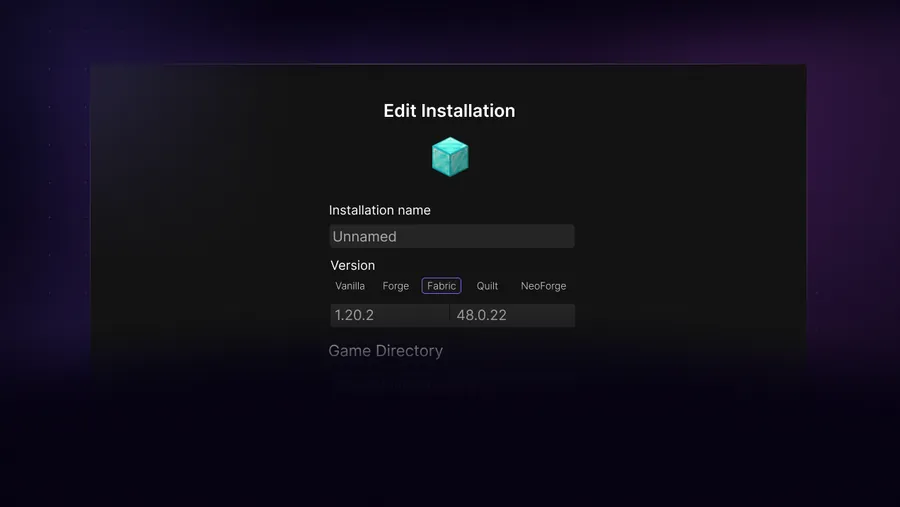
Open the installation manager and create a new installation. Select the exact Minecraft release from the available list, give the profile a clear name and choose a dedicated game directory. Launch vanilla once before adding Fabric, Forge, NeoForge, OptiFine or other components.
If the version does not appear, refresh the version list and inspect the launcher log for network or DNS failures. Do not download an unrelated launcher EXE named after the game version. Version metadata should come through the launcher's installation system.
Open installation manager
Create a new profile instead of overwriting the only working one.
Select the exact game release
Distinguish stable, snapshot and modded entries.
Choose an isolated directory
Keep new configs and worlds separate while testing.
Launch vanilla first
Only add a loader after the base game reaches its main menu.
Check Fabric, Forge, NeoForge and OptiFine support
Loader support usually follows a Minecraft release rather than arriving at the same moment. Fabric, Forge and NeoForge publish their own builds. Mods then publish builds for a specific loader and game version. A newly listed vanilla release may therefore appear before the loader or your favorite mods are ready.
OptiFine and shader support also track specific releases. Do not reuse a renderer or performance mod from a neighboring version unless its project explicitly marks it compatible. For a new Minecraft release, keep the vanilla profile and modded profile separate.
- Confirm the loader lists the exact Minecraft release.
- Confirm every mod lists that loader and release.
- Confirm dependencies such as Fabric API match too.
- Keep an older working profile until the new setup is stable.
Why Minecraft 26.1 or 26.2 may not appear
A missing version can mean the launcher's version manifest did not refresh, the network blocked the metadata host, DNS returned a bad result, system time broke TLS validation, or the game release is not available in the selected channel. Read the log rather than repeatedly reinstalling the same launcher file.
The first-party SKlauncher site currently includes Minecraft 26.2 among its page keywords and media, but that does not prove every loader, mod or older stable launcher workflow supports every 26.2 configuration. The actual installation manager and first-party loader pages remain the operational checks.
| Missing layer | What to check |
|---|---|
| Game version | Installation list, network and logs |
| Fabric/Forge/NeoForge | Loader's supported-version page |
| Mod | Project release files and dependencies |
| Shader | Iris/OptiFine and pack compatibility |
Snapshots and stable releases differ
A snapshot entry is not the same as a stable release with the same year or feature theme. Keep experimental worlds separate.
Upgrade a profile without damaging worlds
Back up the entire profile before changing the Minecraft version. Worlds can be upgraded forward and may become unreadable by older versions. Modded worlds also depend on the mods that created custom blocks, items, dimensions and data.
Create a new profile for the target release, launch a temporary world, add the compatible loader and mods, and only then copy a backup of the important world. Keep the original profile unchanged until the migrated world has been checked.
Copy the old instance
Include saves, configs, mods and scripts.
Build a new profile
Use the target game version in a new directory.
Test without the world
Reach the main menu and load a temporary world.
Migrate a copy
Never test a one-way world upgrade on the only save.
SKlauncher Minecraft version selection checklist
Use this SKlauncher Minecraft version checklist before creating or upgrading a profile. First identify whether a number belongs to the launcher, game or Java runtime. Legacy SKlauncher is 3.2.18, the launched SKlauncher 4 release notes reach 4.0.43, Minecraft 26.1 and 26.2 are game releases, and Java 21 is a runtime. Mixing those labels leads to the wrong download search.
For any SKlauncher Minecraft version, confirm that the exact game release appears in the installation manager. Launch vanilla in a separate directory before selecting Fabric, Forge, NeoForge, OptiFine or another layer. Then verify that every mod supports the same SKlauncher Minecraft version and loader combination. When moving a world forward, copy the entire old profile and test the copy; a world upgraded by a newer game or content mod may not open safely in the previous version.
- The SKlauncher Minecraft version checklist names every profile and loader.
- The SKlauncher Minecraft version checklist separates snapshot and stable directories.
- The SKlauncher Minecraft version checklist verifies loader availability independently.
- Retain the old profile until the migrated world and content are verified.
SKlauncher Minecraft version FAQ
Can SKlauncher 3.2.18 download Minecraft 26.1?
Check the current installation manager for the exact Minecraft 26.1 entry. The launcher and game version numbers are separate.
Is SKlauncher 26.1.2 a launcher version?
No verified stable launcher release with that number is listed. It resembles a Minecraft version query; stable SKlauncher is listed as 3.2.18.
Can I use Fabric or OptiFine with Minecraft 26.2?
Only when the loader or renderer publishes a build for the exact release. Then every mod or shader must also support that combination.
Why is a Minecraft version missing?
Refresh the installation list and inspect network, DNS and launcher logs. The version channel or metadata request may be unavailable.
Should I replace my old profile when updating?
No. Create a separate profile and migrate a copy of the world only after the new vanilla, loader and mod setup works.
Sources and verification
This guide uses current first-party information checked on August 16, 2026.
First-party SKlauncher downloads Official SKlauncher Minecraft changelogs SKlauncher update 3.2